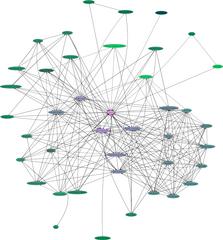
Your own personal Web of Trust graph
trustgraph.shRunning this script with your email address as an argument will create a graph of your key and all the keys that have signed your key. It requires that gpg, sig2dot.pl, and neato (part of graphviz) be in your path, and that you have a keyserver set in your ~/.gnupg/options file.
For example:
$ ls
$./trustgraph.sh darxus@chaosreigns.com
$ ls
darxus@chaosreigns.com.gpg
darxus@chaosreigns.com.ids
darxus@chaosreigns.com.ps
stats.html
As you can see, it created 4 files.
darxus@chaosreigns.com.gpg is a keyring file containing my key and all those
which have signed my key.
darxus@chaosreigns.com.ids is a list of the key IDs of my key and all those who
have signed it.
darxus@chaosreigns.com.ps is a graph of the signature relationships between my
key and all those who have signed it.
stats.html is a graph if signature counts (only counting signatures from within
this keyring file).
I recommend viewing the postscript (.ps) graph with gv, but you can also convert it to a jpeg using convert, which is part of imagemagick like this:
convert darxus@chaosreigns.com.ps darxus@chaosreigns.com.jpg
The postscript file is much better detail and smaller than the jpeg.
sig2dot index
code index
Darxus' Home Page
Sun May 5 17:16:57 EDT 2002